A graphical abstract is one image that shows a reader what you asked, what you did and what you found. Journals do not agree on its size, file type or layout, and a file that suits one publisher can be rejected by the next. Elsevier, for example, asks for at least 1328 x 531 pixels at 300 dpi[1], while the American Chemical Society wants a graphic no larger than 3.25 by 1.75 inches[3]. This guide puts the rules of five publishers side by side, shows a layout that works for all of them, and walks through a before and after example, and annotates a real graphical abstract published in Cell Reports Medicine.
In Simple Words
A graphical abstract is a picture summary of your paper. Read your journal’s page first, because size and file type differ. Build one idea in three steps, question, method and finding, from left to right. Use big type, keep it simple, and test it at the small size readers will really see.
What is a graphical abstract, and what is it not?
A graphical abstract is an original image that clearly represents the work in your paper. Elsevier asks for a clear start and end, preferably reading top to bottom or left to right, with distracting and cluttered elements removed[1]. It is not a copy of a figure from the paper. MDPI says it must not duplicate any figure in the paper, be a simple collage of subfigures, or combine the text abstract with a picture[6]. The American Chemical Society adds that it should convey the essence of the article without specific results[3].
Do not confuse it with a visual abstract. A graphical abstract is submitted with the manuscript and shown on the journal page. A visual abstract is usually made later to promote the paper on social media[8]. You can build the second from the first, and the layout below works for both.
Graphical abstract requirements by journal
Table 1 collects what five publishers say in their own author guidance. We opened each page on 27 October 2026. Where a publisher sets a minimum, the table says so; where it sets a maximum, it says that instead.
Table 1. Graphical abstract rules from five publishers.
| Publisher | Size rule | Resolution | File type | Text and content rules |
|---|---|---|---|---|
| Elsevier[1] | Minimum 1328 x 531 pixels (width x height). Keep the 500:200 ratio if larger. Shown on ScienceDirect in a 500 x 200 pixel box | Minimum 300 dpi | TIFF, EPS, PDF or MS Office, as a separate file | Times, Arial, Courier or Symbol in a large size. No synopsis outside the image. No “Graphical Abstract” heading inside it |
| Cell Reports[2] | 1200 pixels square | 300 dpi | Not stated on the guidelines page | Arial, 12 to 16 points. Required only at final submission, though it may be sent earlier |
| ACS journals[3][9] | No larger than 3.25 x 1.75 inches (about 8.25 x 4.45 cm), submitted at actual size | Colour TIF 300 dpi. Black and white TIF 1200 dpi | TIF, or EPS in RGB with fonts outlined or embedded | Sans serif such as Helvetica, preferably 8 pt and never below 6 pt. Original artwork only, no logos or people. Do not reuse a figure from the text |
| RSC, Chemical Science and RSC Advances[4][5] | Maximum 8 cm wide x 4 cm high, filling the space | 600 dpi or greater | TIFF for the graphic. Text (1 to 2 sentences, 250 characters at most) in an editable file such as .docx | Sent at the revision stage, not with the first submission |
| MDPI[6] | Minimum 560 x 1100 pixels (height x width) | Not stated | PNG, JPEG or TIFF | Times, Arial, Courier, Helvetica, Ubuntu or Calibri. No large text blocks or blank areas. No “Graphical Abstract” heading. Original, unpublished artwork |
Two things stand out. First, the rules do not agree on shape: Figure 1 draws the five frames at the same width, and Cell Reports wants a square while Elsevier wants a long strip. Second, only some publishers set a resolution, so always read your own journal’s page before you export. Arial appears in the Elsevier, Cell Reports and MDPI lists, which makes it a safe default.
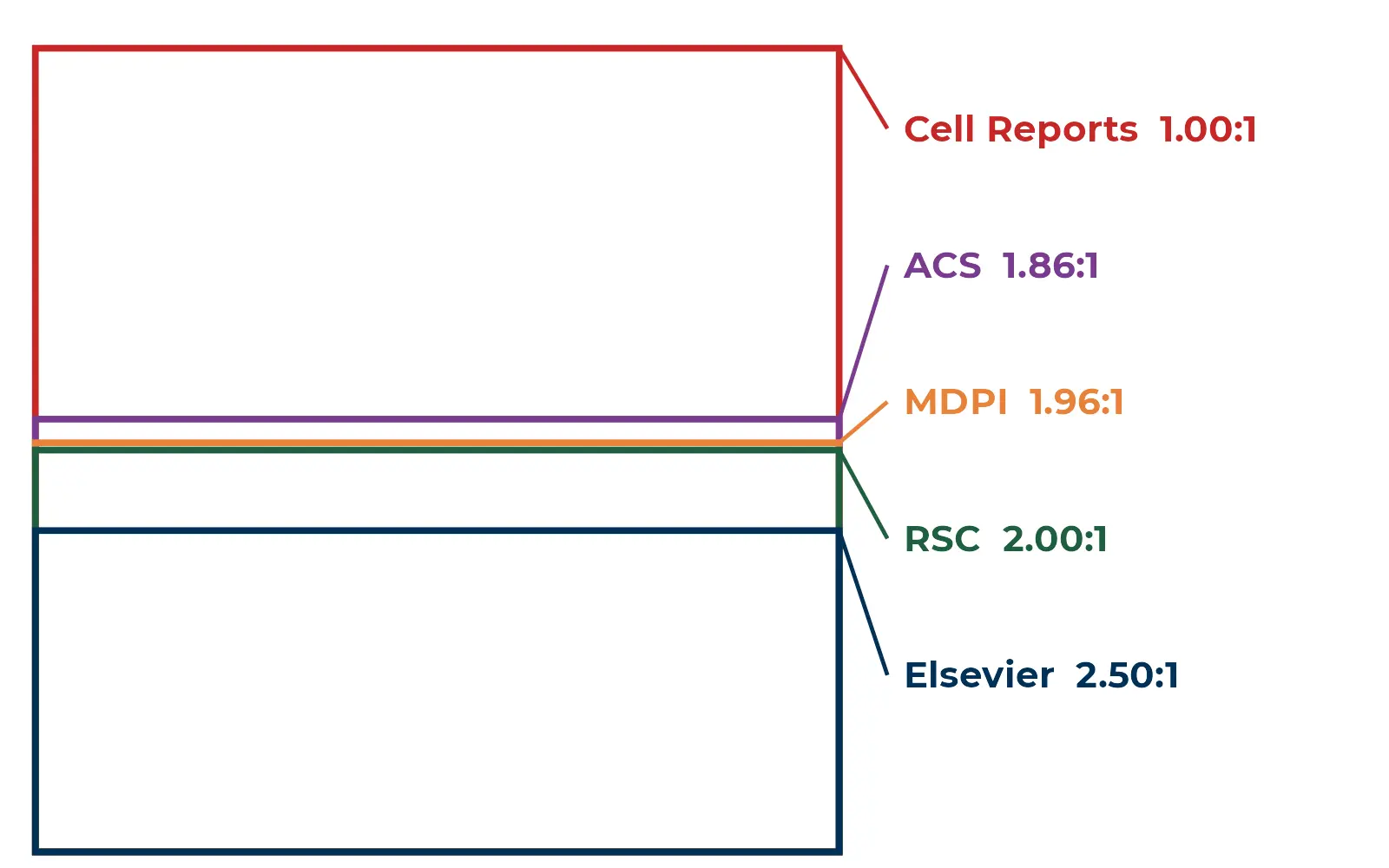
What the sizes mean in pixels
Centimetres and pixels are easy to mix up. Table 2 converts each rule into pixels using the stated resolution. This is our own arithmetic: pixels = inches x dpi, and 1 inch = 2.54 cm.
Table 2. The same rules in pixels (Editverse calculation).
| Publisher | Rule | Working size in pixels |
|---|---|---|
| Elsevier | At least 1328 x 531 px at 300 dpi | 1328 x 531 px, about 11.2 x 4.5 cm at 300 dpi |
| Cell Reports | 1200 px square at 300 dpi | 1200 x 1200 px, 4 inches (about 10.2 cm) a side |
| ACS (colour) | Up to 3.25 x 1.75 in at 300 dpi | 975 x 525 px at most |
| ACS (black and white) | Up to 3.25 x 1.75 in at 1200 dpi | 3900 x 2100 px at most |
| RSC | Up to 8 x 4 cm at 600 dpi | About 1890 x 945 px at most |
| MDPI | At least 560 x 1100 px (height x width) | 1100 x 560 px at least |
The practical rule: build your master at the largest size you will need, keep the ratio the journal states, and export down. Enlarging a small file makes text soft. If you must serve several journals, keep the three zones as separate layers so you can restack them into a square for a publisher like Cell Reports.
How to lay out a graphical abstract
Elsevier asks for a clear start and end and a top to bottom or left to right reading order[1]. Figure 2 turns that into a simple frame with three zones. The finding gets the biggest zone, because it is the one idea you want remembered.

Type size and fonts
Elsevier shrinks the image to fit a 500 x 200 pixel box on ScienceDirect and to a window 200 pixels high in the table of contents, so it tells authors to use a large font[1]. Cell Reports sets Arial at 12 to 16 points[2], and ACS prefers 8 point sans serif type at its small 3.25 inch width, never below 6 points[3]. Put together, the lesson is the same: fewer words, bigger words.
What to leave out
- A “Graphical Abstract” heading inside the image (Elsevier and MDPI both say no).
- A pasted figure or a collage of subfigures from the paper.
- Logos, trademarked items and pictures of people (ACS).
- White borders, big blank areas and long text blocks.
Graphical abstract example: before and after
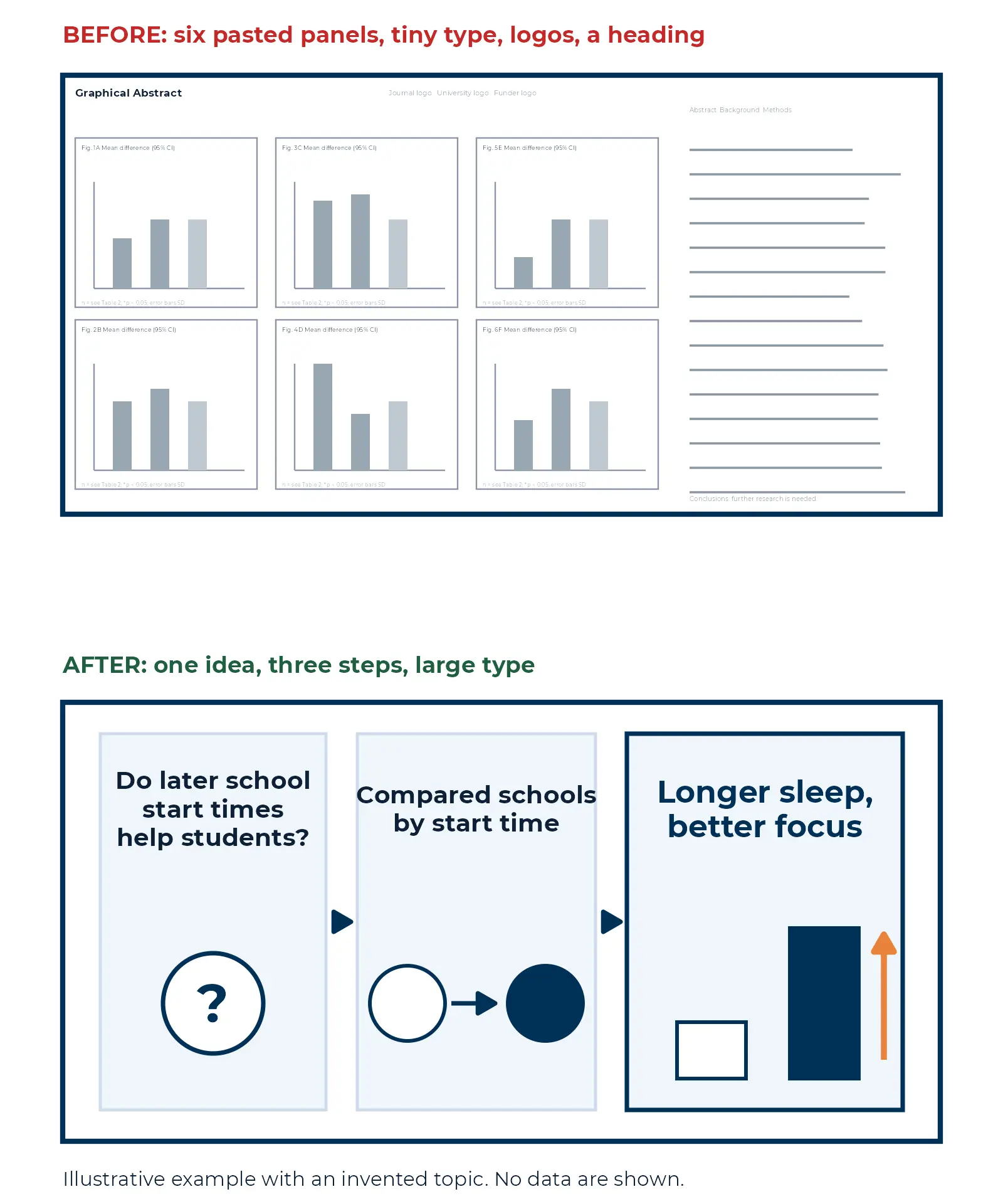
Figure 3 shows the most common fix, which is subtraction. The topic is invented for the illustration and no data are plotted. The top image does what many first drafts do: it pastes six panels from the paper, adds logos and a heading, and sets everything in tiny type. At the size a reader sees on a journal page, none of it can be read. The bottom image keeps one question, one method picture and one takeaway.
A real graphical abstract, annotated
Figure 4 takes a graphical abstract published in Cell Reports Medicine, found through PubMed and reused under its CC BY 4.0 licence[10]. The study tested whether adding indigo light to a warm white LED prevents lens-induced myopia in tree shrews, a near-primate model, and found that indigo light in the 419 to 446 nm range completely suppressed it[10]. The image is square, the frame Cell Press journals ask for (Table 1), and it follows the three-zone layout in Figure 2.

What the markers in Figure 4 show. Markers 1 to 6 are what it does well; marker 7 is what fails the shrink test.
- 1One message as the title. It names the topic of the finding. There is no “Graphical Abstract” heading.
- 2A clear start. The myopia-inducing stimulus, a minus lens, sits on the left.
- 3Reading order. Arrows carry the eye left to right, from stimulus to outcome.
- 4Control vs intervention. Two rows share one layout, so the only visible difference is the light.
- 5One accent colour. Violet marks indigo light wherever it appears, from the title to the last line.
- 6A clear end. The takeaway closes the image in plain words and in colour.
- 7Shrink-test fail. The spectrum tick labels are tiny. At 500 pixels wide they cannot be read, and the picture works without them.
The logic is the same as in Figure 2: stimulus on the left, light in the middle, outcome on the right, repeated in two rows so the reader compares control with intervention at a glance. One colour, violet, carries the intervention from the title to the closing sentence. The one slip is small type: the wavelength tick labels would not pass the shrink test in Step 6, and the picture loses nothing without them. Mark up your own draft the same way. Number the start, the path, the comparison and the end, then circle anything you cannot read at 500 pixels wide.
Make a graphical abstract in seven steps
Step 1. Read your journal’s page first.
Size, file type and timing differ. Cell Reports needs it only at final submission[2], and RSC collects it at the revision stage[4]. If you are at that stage now, our guide to a major revision decision shows how to plan the whole response.
Step 2. Write the message in one sentence.
If you cannot state your finding in about twelve words, the picture will not be clear either.
Step 3. Split it into three zones.
Question, method, finding. Give the finding the most room.
Step 4. Choose the frame.
Take the ratio from Table 1 and build at the largest size you need. Keep margins inside the safe line.
Step 5. Draw with simple shapes.
Use one accent colour, flat shapes and a sans serif font such as Arial. For charts, keep to one clean plot; our guide to clinical research graphs and the note on choosing the right graph type help you pick it.
Step 6. Run a shrink test.
Look at it at 500 pixels wide, the Elsevier display box[1]. If you cannot read every word without zooming, enlarge the type or cut words.
Step 7. Export and check permissions.
Save in the file type the journal names, as a separate file where asked. Any third-party artwork needs permission[1], and ACS wants entirely original artwork[3]. If you use AI tools, follow the publisher’s policy; see our note on the AI watermark policy in academic publishing.
Do graphical abstracts help?
The evidence is mixed, so treat the graphical abstract as a communication tool rather than a guaranteed boost. One study of 1,326 manuscripts in the journal Molecules compared the 566 with a graphical abstract and the 760 without, and found no sign that articles with one were more visible in downloads, abstract views or citations[7]. A different study looked at promotion on social media: 40 articles in the American Journal of Nephrology were each tweeted three ways. Tweets with a visual abstract averaged 1,351 views against 639 for citation-only tweets, and had an engagement rate of 5.7% against 2.4%, although link clicks did not differ[8]. In plain terms: a clear picture helps people notice and share a paper, so make it for clarity and reuse it when you promote the article.
Graphical abstract checklist
- I have read my journal’s page and know the size, resolution, file type and deadline.
- The image is original and is not a figure from my paper.
- It reads left to right with one clear start and one clear end.
- The finding is the largest element, and there is no heading inside the image.
- Every word is readable at 500 pixels wide.
- Fonts are sans serif and at least the journal’s minimum size.
- No logos, no extra borders and no big blank areas.
- Any outside artwork has permission, and AI use follows the publisher’s policy.
- The file is exported in the right type, at the right size, as a separate file if asked.
Frequently asked questions
What size should a graphical abstract be?
It depends on the journal. Elsevier asks for at least 1328 x 531 pixels at 300 dpi[1], Cell Reports for 1200 pixels square[2], ACS for no more than 3.25 x 1.75 inches[3], RSC for no more than 8 x 4 cm[4] and MDPI for at least 560 x 1100 pixels[6]. Check your own journal.
Is a graphical abstract required?
It varies. ACS says Communications and Articles in its JACS guidelines must contain both an abstract and a TOC graphic[9]. Cell Reports requires it only with the final submission[2]. Other journals only encourage it.
Can I reuse a figure from my paper?
Usually not. Elsevier asks for an original image[1], MDPI says it must not duplicate a figure in the paper[6], and ACS says not to reuse a graphic that appears in the text[3].
Which font is safest?
Arial appears in the Elsevier, Cell Reports and MDPI lists. ACS asks for a sans serif such as Helvetica. Use the size your journal states.
Can I use AI to make one?
Elsevier says any use of generative AI or AI-assisted tools must follow its generative AI policies for journals[1]. Read your publisher’s policy before you submit.
Need a Graphical Abstract Made? Consult Editverse
A good graphical abstract needs a clear message, the right size and clean artwork. Editverse subject-matter experts work to COPE, ICMJE and GPP 2022 guidance, with institutional and country-specific ethics followed. Choose the service that matches what you need, or see all publication support services.

Editverse
Publication Support Services
Journal asks for a graphical abstract? Get one built to its exact size.
You send: your manuscript or abstract and your target journal.
You get: a concept consultation, a professional design sized and formatted to the journal, source files and unlimited revisions until you approve.
When: standard turnaround is 2 to 3 business days.
Graphical Abstract Creation · $150
Editverse
Data & Statistical Services
Turning results into pictures? Have the figures drawn to journal standard.
You send: your data, rough sketches or existing charts, plus your target journal.
You get: up to 10 figures as vector PDF, PNG, EPS and TIFF, with colour-blind-safe palettes and editable source files.
When: 3 to 5 business days for up to 10 figures.
Data Visualization Service · $300
Editverse
Editing Services
Figures sent back for size or format? Get them checked before you submit.
You send: your figures, tables and supplementary files, plus the journal’s requirements.
You get: formatted tables, edited legends and captions, and resolution and format checked against the journal.
When: standard turnaround is 2 to 3 business days.
Figures & Tables Editing · $125
Free Research Tools from Editverse
- GraphPro: build publication-ready charts, 25 types, with built-in t-test, ANOVA, correlation and chi-square p-values. Free, no signup.
- StatPro: free statistical calculators and a test-selector tool covering group comparisons, categorical outcomes, time-to-event analysis and diagnostic accuracy.
- Flowchart Pro: generate PRISMA 2020, PRISMA-ScR, CONSORT, STROBE, STARD, MOOSE and ARRIVE flow diagrams directly in your browser.
Conclusion
A graphical abstract works when it says one thing, in three steps, in type big enough to survive shrinking. Read your journal’s page, take the frame and file type from it, subtract everything that is not the question, the method or the finding, and test it at 500 pixels wide. The five publisher pages we checked agree on the spirit even where they differ on numbers[1][2][3][4][6]. All sources were checked on 27 October 2026.
References
- Elsevier. Graphical abstract: guidance for authors. elsevier.com/authors/journal-authors/graphical-abstract. Accessed 27 October 2026.
- Cell Press. Cell Reports information for authors (graphical abstract). cell.com/cell-reports/authors. Accessed 27 October 2026.
- American Chemical Society. Guidelines for Table of Contents/Abstract Graphics. pubsapp.acs.org/paragonplus/submission/toc_abstract_graphics_guidelines.pdf. Accessed 27 October 2026.
- Royal Society of Chemistry. Author guidelines for Chemical Science. rsc.org/publishing/publish-with-us/publish-a-journal-article/chemical-science. Accessed 27 October 2026.
- Royal Society of Chemistry. Author guidelines for RSC Advances. rsc.org/publishing/publish-with-us/publish-a-journal-article/rsc-advances. Accessed 27 October 2026.
- MDPI. Manuscript preparation and layout, section on the graphical abstract. mdpi.com/authors/layout. Accessed 27 October 2026.
- Pferschy-Wenzig EM, Pferschy U, Wang D, Mocan A, Atanasov AG. Does a graphical abstract bring more visibility to your paper? Molecules. 2016;21(9):1247. doi:10.3390/molecules21091247 [PMID: 27649137]
- Oska S, Lerma E, Topf J. A picture is worth a thousand views: a triple crossover trial of visual abstracts to examine their impact on research dissemination. J Med Internet Res. 2020;22(12):e22327. doi:10.2196/22327 [PMID: 33275112]
- American Chemical Society. JACS author guidelines. researcher-resources.acs.org/publish/author_guidelines?coden=jacsat. Accessed 27 October 2026.
- Grytz R, El Hamdaoui M, Yamashita T, D’Souza S, KhalafAllah M, Inanici M, et al. Prevention of myopia in a near-primate by supplemental indigo light suggests a hypothesis for the myopia boom. Cell Rep Med. 2026;7(9):102999. doi:10.1016/j.xcrm.2026.102999 [PMID: 42612637]. Open access under CC BY 4.0.