
Almost half of scholarly journals like Science and Nature use visuals. This shows how important data representation is in academic writing. 3D graphs are great for showing complex data but can be tricky if not used right. For example, data visualization in academic writing suggests using 3D graphs for data like Arctic Sea ice volume changes.
3D graphs are powerful for showing complex data in academic writing. But, they can be too much and hard to understand if not done right. It’s key to know when to use them and when to avoid them. This ensures our data is clear, accurate, and grabs the reader’s attention.
Key Takeaways
- 3D graphs can effectively present complex data in academic visualization, enhancing data representation and clarity.
- The use of 3D graphs can be beneficial in representing three-dimensional data, such as the visualization of the relative volume change of Arctic Sea ice.
- 3D graphs can be overwhelming and difficult to interpret if not used correctly, emphasizing the need for careful consideration in their application.
- Academic writing benefits from the strategic use of 3D graphs, as they can improve data interpretation and engagement, ultimately facilitating the communication of research findings.
- Best practices for creating effective 3D graphs involve balancing complexity with clarity, ensuring that the visualization is both informative and accessible to the target audience.
- By understanding the strengths and limitations of 3D graphs, researchers can harness their potential to elevate the quality and impact of their academic work, contributing to the advancement of knowledge in their respective fields.
- As we explore the applications and benefits of 3D graphs in academic writing, we must remain mindful of the importance of data representation, recognizing that effective visualization is crucial to the successful communication of research findings.
Understanding 3D Graphs in Data Representation
We offer advanced data visualization services. This includes using 3D plotting software for researchers and academics. We will explore what 3D graphs are and why they matter, along with common types used in data representation.
Definition of 3D Graphs
3D graphs show data in three dimensions. They help display complex relationships between variables. This makes them great for large datasets and can be made with 3D plotting software.
Importance of Visualizing Data
Seeing data is key in academic writing. It helps spot patterns, trends, and correlations not seen in raw data. Advanced visualizations, like 3D graphs, aid in understanding complex data and sharing findings.
Common Types of 3D Graphs
Common 3D graphs include scatter plots, surface plots, and bar charts (for when scatter plots specifically earn their place, see When Not to Use Scatter Plots). They’re used for various data, from science to economics. With 3D plotting software, researchers can make interactive, dynamic visuals.
Advanced data visualization, like 3D graphs, opens up new insights. Our team is committed to top-notch data visualization services. We create 3D graphs with specialized software.
True 3D vs. Pseudo-3D: The Distinction That Matters

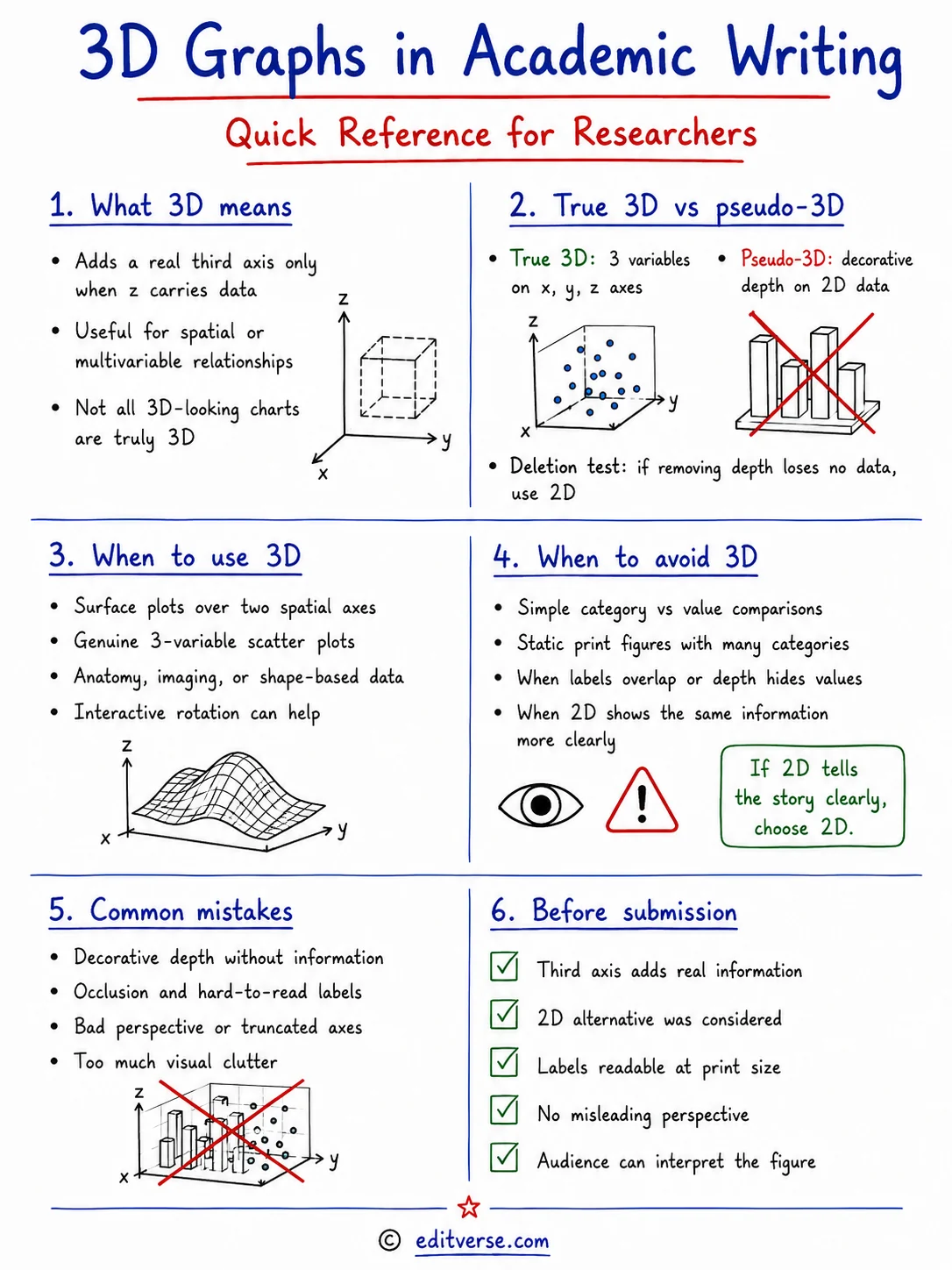
Run the deletion test shown above before building any 3D figure. Franconeri and colleagues (2021), reviewing visual data communication research in Psychological Science in the Public Interest, found that the visual system extracts broad statistical patterns from a display quickly while comparisons between subsets of values remain slow, which is exactly the work decorative depth makes harder without returning a variable in exchange.
Not every chart that looks three-dimensional is actually plotting three dimensions of data. This distinction gets lost in most style debates, but it’s the single most useful question to ask before building a 3D graph: is the depth doing real work, or is it decoration?
True 3D graphs plot three genuine variables along independent x, y, and z axes – a surface plot showing temperature across latitude and longitude, or a scatter plot relating three continuous measurements. The third axis carries real information that a 2D chart cannot show without dropping a variable entirely. A pseudo-3D graph is different: it takes ordinary two-variable data (a category and a value) and adds depth, shadow, or a 3D bevel purely for visual style. A 3D bar chart comparing sales by region is still just two variables – region and sales – wearing a three-dimensional costume.
| True 3D Graph | Pseudo-3D Graph |
|---|---|
| 3D scatter plot relating three continuous variables | 3D bar chart of a simple category-vs-value comparison |
| Surface plot mapping a value across two spatial axes (e.g., elevation over latitude/longitude) | Pie chart tilted and given false depth and shadow |
| Removing the third axis would delete real data | Removing the depth effect changes nothing about the data shown |
The reason this distinction affects reader accuracy traces back to Cleveland and McGill’s foundational graphical-perception research (1984), which ranked how accurately readers judge different visual encodings: position along a shared axis first, then length, then angle, area, and volume, roughly in descending order of accuracy. Pseudo-3D effects push a chart toward the least accurate end of that ranking – volume, foreshortened angles, occluded depth – without adding any information to justify the cost. True 3D graphs pay that same perceptual cost, but at least buy back a real third variable in return.
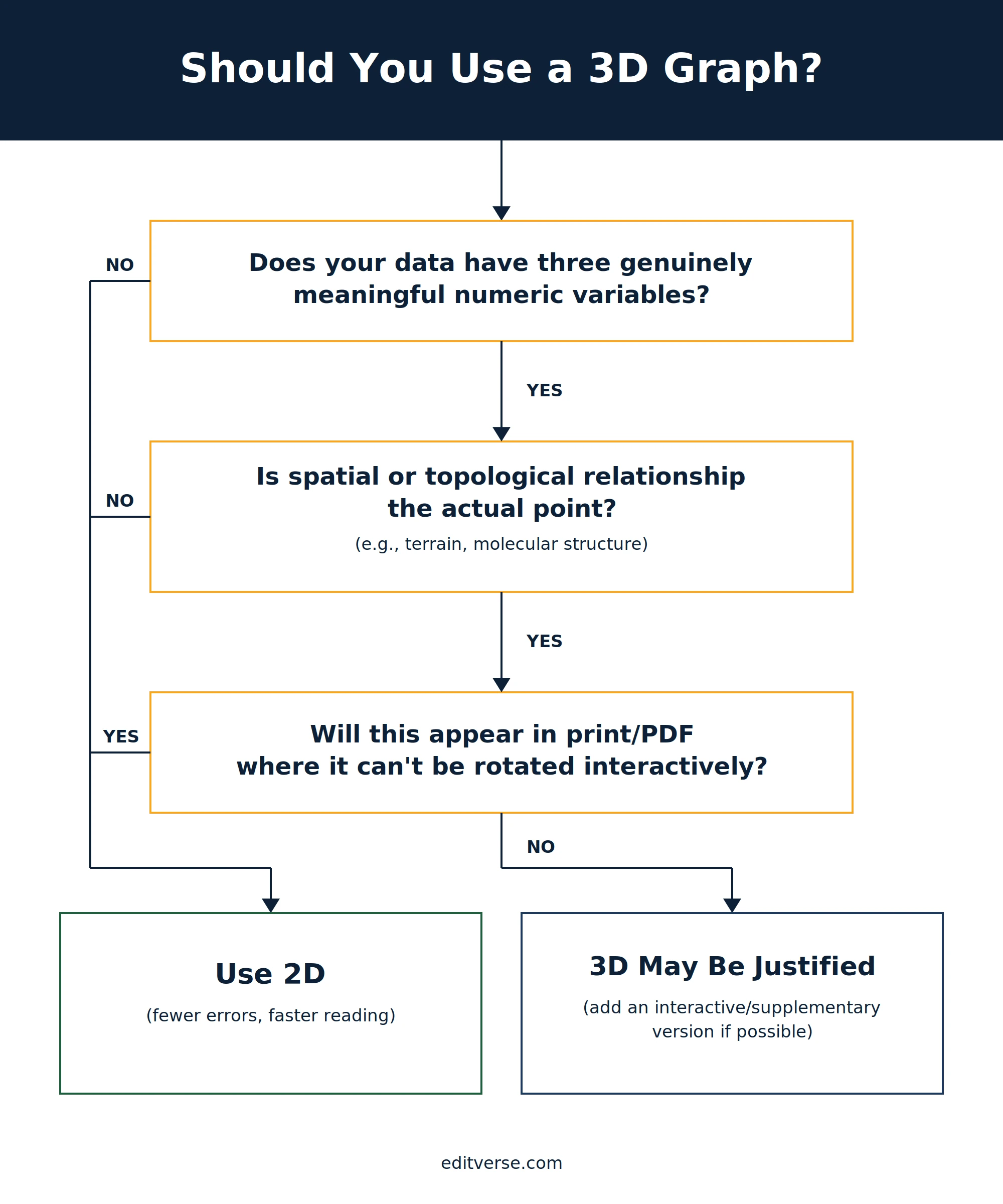
The practical test: if removing the third axis would delete real data, 3D is a legitimate candidate. If removing it would only flatten a decorative effect, the underlying data was 2D all along and should be shown that way.
What the Research Actually Shows About 3D Charts
A Worked Example: The Same Data, Plotted Two Ways
To make the true 3D vs. pseudo-3D distinction concrete, here is a real clinical dataset shown both ways: 189 births recorded at Baystate Medical Center — the classic Hosmer & Lemeshow birthwt dataset — capturing a mother’s age, her weight at her last menstrual period, whether she smoked during pregnancy, and the resulting birth weight.

Plotted as true 3D, age, maternal weight, and birth weight occupy three real spatial axes, with colour marking smoking status as a fourth variable — a legitimate use of 3D precisely because collapsing any axis would delete real data. The same four variables fit just as completely into a 2D bubble chart, though: position for two variables, size and colour for the other two, with no rotation, occlusion, or perspective distortion for the reader to fight through.

Recent research complicates the simple “3D is worse” narrative in an interesting way: readers say they don’t like 3D, but when tested, they don’t actually perform worse with it.
Svalina, Banić and Kovačević (2024), Digital 4(4):932–946, DOI: 10.3390/digital4040046 – In an eye-tracking study, 93% of participants preferred 2D bar charts when given a straight choice between 2D and 3D. Yet eye-tracking data found no significant difference between the two in fixation count (p=.87), fixation duration (p=.89), or answer accuracy (p=1.00). This looks like a trust gap, not a comprehension gap – readers distrust 3D more than the data justifies.
That gap between preference and performance shows up elsewhere in the literature. Gaissmaier, Tiede and Garcia-Retamero (2023), in a randomized study of 160 participants published in Medical Decision Making 43(7-8):774–788 (PMID: 37872798, DOI: 10.1177/0272989X231201579), found that readers tend to pick the display they find more attractive over the one they actually understand better – a pattern that helps explain why polished 3D graphics persist despite the evidence against them.
More recent work continues to probe this territory. Chen, Zhang and Xue (2025), presented at HCI International 2025 (Springer LNCS, DOI: 10.1007/978-3-031-93819-1_1), assessed the perceptual quality of the visual encodings used to build 3D charts. And in a related reassessment of chart accuracy, Hill (2025) revisited pie and donut charts against bar charts in Information Visualization 24(1):3–23 (DOI: 10.1177/14738716241259432) – a reminder that “which chart type is most accurate” is still an active research question even for chart types far more common than 3D.

What readers say and what readers do come apart in the dashboard above. A similar divergence runs through health risk communication, where van Weert and colleagues (2021) tested six graph formats with 446 adults and found pie charts, among the most preferred options, poorly understood by younger and older participants alike, while the plainer bar chart was understood reasonably well in both groups.
A Necessary Caveat: 3D Isn’t Always the Real Culprit

Side by side above, a truncated y-axis inflates a trivial difference while a correctly scaled three-variable plot reads cleanly. Nguyen and colleagues (2021) argued along the same lines in Visual Computing for Industry, Biomedicine and Art, reviewing misleading visualizations across scientific publications and tracing them to root causes in how data was visually encoded rather than to any single chart type.
None of this means every 3D graph is guilty until proven innocent. Data visualization writer Robert Kosara has argued on his site eagereyes.org that blanket “never use 3D” rules oversimplify a more complicated picture – turning chart criticism into a formula instead of encouraging readers to actually examine the data. His point: readers often misjudge chart values for reasons that have nothing to do with dimensionality. A truncated axis that exaggerates small differences, or bars left unsorted so neighboring comparisons become harder to judge, can distort a plain 2D bar chart more badly than a carefully built 3D one.
The practical takeaway isn’t that 3D is secretly fine by default. It’s that dimensionality is only one of several variables that determine whether a graph misleads its reader – fixing the axis, the sorting, and the scale will usually do more for accuracy than banning a chart type outright. Treat 3D as one more design choice to scrutinize, not an automatic disqualifier.
Applications of 3D Graphs in Academic Visualization
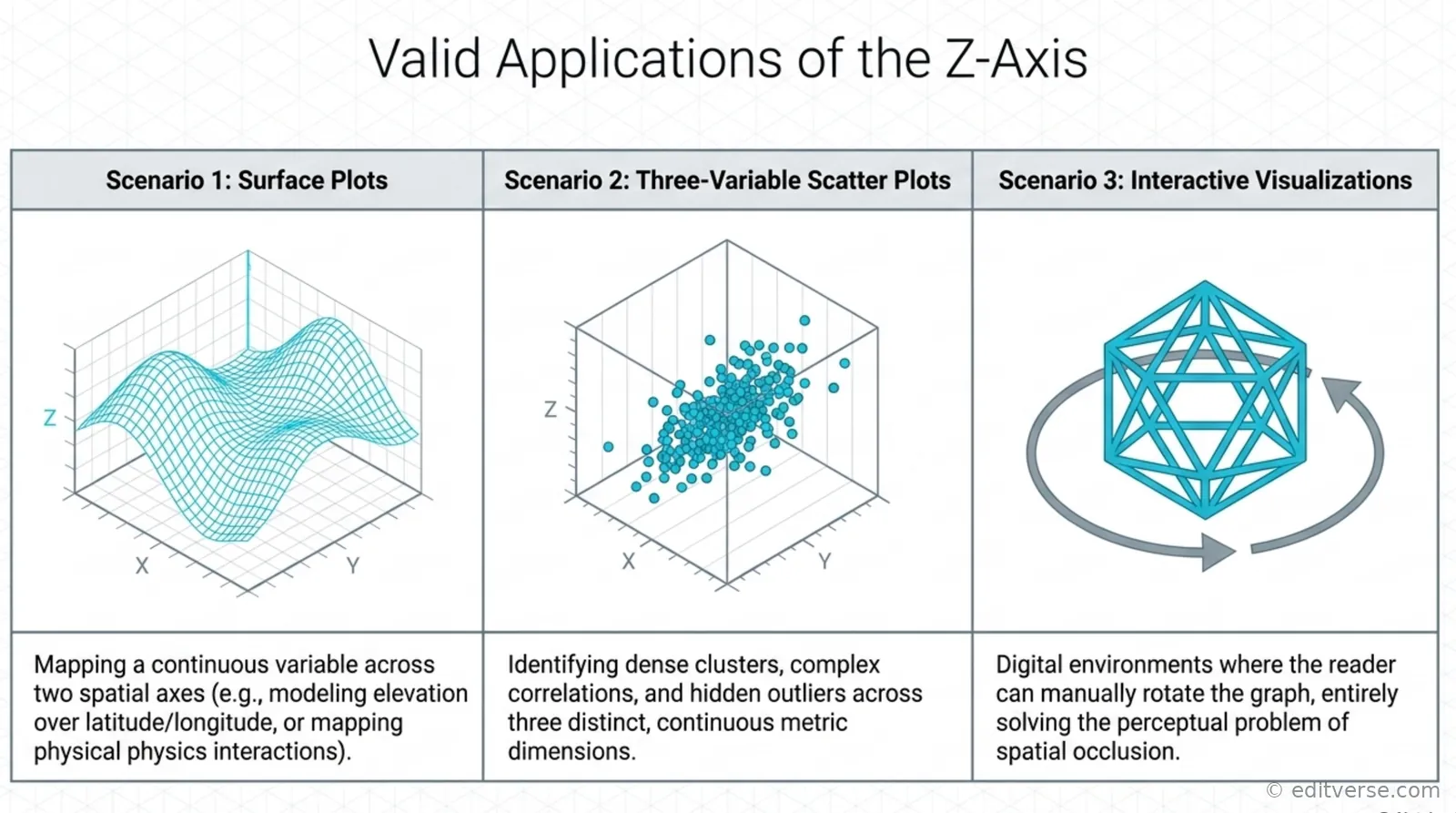
All three panels above share one property, namely that removing the z-axis would delete information rather than tidy the display. Clinical practice tests this at scale, with Zeng and colleagues (2024) comparing three-dimensional reconstruction visualization against conventional 2D imaging for preoperative assessment in 3,402 hepatocellular carcinoma patients across five centres, a design that only makes sense where the third dimension carries genuine anatomical information.
We use 3D graphs in many fields to make educational data more visual and interactive. These graphs are great for showing complex data. They help us spot patterns and trends.
Fields That Benefit from 3D Graphs
Many fields use 3D graphs, like science, engineering, and economics. For example, 3D scatter plots help find clusters, see correlations, and spot outliers in different industries.
Enhancing Clarity and Engagement
3D graphs make things clearer and more engaging. They offer a deeper, more interactive experience. They’re used to make interactive visualizations, like 3D surface plots. These are common for modeling surfaces and analyzing interactions.
Case Studies of Effective Use
There are many examples of 3D graphs being used well in education. For instance, 3D heatmaps are great for spotting concentrations and patterns in fields like epidemiology and statistical analysis.
Some main uses of 3D graphs include:
- Modeling surfaces and interaction analysis
- Identifying clusters, correlations, and outliers
- Creating interactive visualizations
- Enhancing clarity and engagement
Benefits of Using 3D Graphs
We use 3D graphs to make our data analysis better. They help us understand complex data sets more fully. With these tools, researchers can share their findings in a way that’s easy to grasp.
3D graphs make it easier to see how different variables work together. This helps spot patterns and trends that might be hard to see in 2D. They also make data more engaging and interactive, helping people remember it better.
Some big pluses of 3D data visualization are:
- Enhanced perception of depth and spatial relationships
- Improved engagement and interaction with the data
- Effective communication of complex information
By using 3D graphs, we can create more insightful and engaging visuals. This helps us understand our data better and make smarter decisions.
When to Use 3D Graphs
We use 3D graphs to make data easier to understand and more engaging. They are great for showing complex data in a simple way. This makes it easier for people to see how different things are connected.
When thinking about using 3D graphs, consider a few things:
- Is the data about places or shapes?
- Can 2D graphs show the data well, or does it need 3D?
- Will the people looking at it know what 3D graphs mean?
Studies show that 3D graphs can sometimes make things harder to understand. But, when used right, they can be very powerful. They help researchers share complex ideas in a way that grabs attention.
By carefully choosing when to use 3D graphs, researchers can make their work clearer and more impactful. This way, they can share their findings in a way that really connects with people.
| Graph Type | Use Case |
|---|---|
| 3D Graphs | Enhancing spatial understanding and providing clear and compelling data |
| 2D Graphs | Presenting simple relationships between variables |
Situations to Avoid 3D Graphs
Choosing the right chart type in the first place heads off most of these problems before they start – see our full guide to choosing the right graph type for your data for a systematic approach.

Each panel above fails differently, though all three end with a reader doing extra work for no additional information. Legibility failures of this kind are widespread, and Schmied and Jambor (2021) attribute them largely to gaps in training, noting that roughly a quarter of figures in biomedical publications contain images and that many reach print with details invisible or information missing.
3D graphs can be very useful for showing data, but they’re not always the best option. Studies have found that 3D graphs can actually make things harder to understand. It’s important to choose the right tool for the job, based on the data and who you’re sharing it with.
There are times when 3D graphs just don’t make sense. For example, with simple data, they can add too much complexity. This makes it tough for people to get the point. Also, 3D graphs can mess with clarity, especially when there’s a lot of data.
Here are some things to think about before using 3D graphs:
- Avoid using 3D graphs for simple data, as they can introduce unnecessary complexity.
- Be cautious when using 3D graphs with many categories or data points, as they can be difficult to read and understand.
- Consider using alternative visualization methods, such as 2D graphs or tables, when clarity and readability are paramount.
5 research-backed anti-patterns: (1) Pseudo-3D on 2D data adds clutter without information gain—Cleveland & McGill 1984 still holds. (2) If viewers cannot perceive depth cues (grayscale print, flat screens, monocular vision), 3D becomes worse than useless. (3) Older viewers and those with spatial reasoning challenges need 2D. Test with your audience. (4) Poor resolution breaks stereopsis completely. Verify your delivery medium supports stereoscopic rendering or use 2D. (5) High cognitive load (new concepts, time pressure) makes 3D overhead exceed working-memory capacity—2D wins (Gaissmaier et al., 2023).
Best Practices for Creating 3D Graphs
Creating effective 3D graphs requires careful thought. We need to pick the right tool, simplify visual elements, and use colors wisely. Understanding data visualization best practices helps us make better choices.
When choosing a 3D plotting software, look for tools that are easy to use and flexible. Important factors include:
- Compatibility with various data formats
- User-friendly interface for customization
- Options for exporting and sharing visualizations
It’s also key to simplify visual elements. This means:
- Using a limited color palette to avoid visual overload
- Avoiding unnecessary 3D effects that can impede comprehension
- Ensuring consistency in chart styles across a series
By following these tips and using the right software, we can make engaging and informative visualizations. These help our audience understand complex data better.
The main goal of data visualization is to clearly present information. By focusing on simplicity, consistency, and accessibility, we can effectively share our message.
2D vs. 3D: A Comparative Analysis
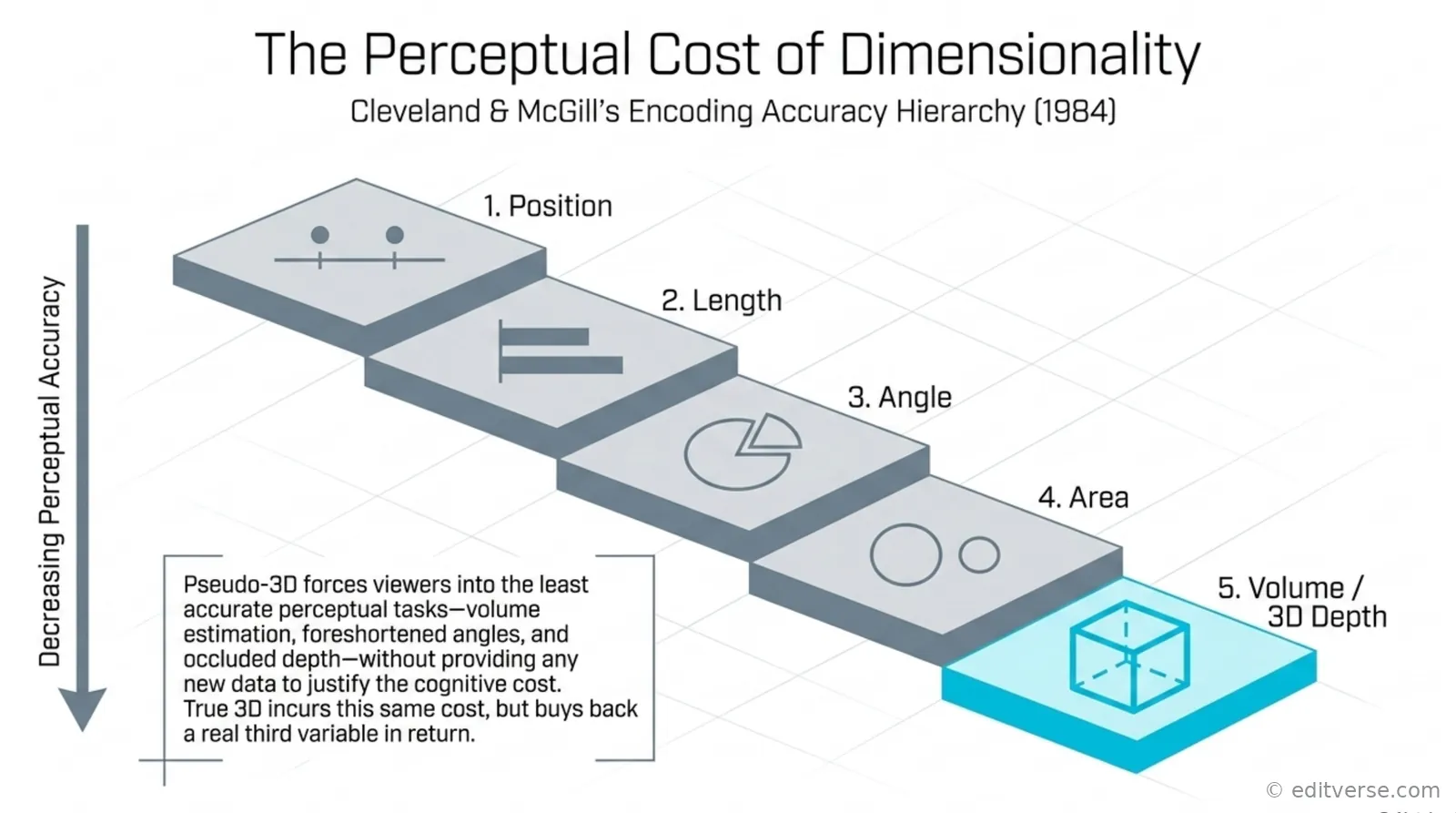
Above, the hierarchy makes that cost explicit. Vickers and colleagues (2020) reached a compatible conclusion from the clinical side, proposing six reporting principles for figures and tables in The Journal of Urology that restrict graphs to cases where they improve the reader’s ability to understand the study findings, and that warn against accepting whatever chart type statistical software offers by default.
Choosing between 2D and 3D graphs for data is a common dilemma. Each has its own advantages and disadvantages. The right choice depends on the project’s needs. Knowing the differences between these graphs is key for good data visualization.
2D graphs are great for simple data. On the other hand, 3D graphs are better for complex data. But, 3D graphs can be tricky because of viewpoint choices and clutter.
Key Differences Between 2D and 3D Graphs
2D and 3D graphs differ in how they show high-dimensional data. 3D projections are an option, but they’re harder to analyze. Yet, 3D graphs with explanations can encourage users to explore data more than 2D ones.
When 2D Might Be Preferable
Research shows 2D visualizations can outperform 3D in some cases. A study in Lagos found students did better with 2D visuals for organic molecules than with 3D.
Combining 2D and 3D Visuals
Using both 2D and 3D visuals together can be beneficial (our guide to combining graph types covers this in more depth). It offers a deeper understanding of complex data. This is especially helpful in fields where data visualization is crucial.
In conclusion, the choice between 2D and 3D graphs depends on the project’s needs. By understanding each type’s strengths and weaknesses, researchers can create better visualizations. This helps in clearly communicating findings.
| Graph Type | Strengths | Weaknesses |
|---|---|---|
| 2D Graphs | Ideal for simple data, easy to analyze | May not capture complex relationships |
| 3D Graphs | Can capture high-dimensional data, provides more detailed information | Can be challenging to analyze, may require more effort |
Feedback from Academic Peers and Experts
We know how vital feedback from peers and experts is for making great 3D graphs. It helps us make sure our data is clear and easy to understand. By listening to their advice, we can make our visualizations better and more engaging.
Research shows that visuals can be better than words in some tasks. They keep spatial and relational data intact (Vessey and Galletta 1991). This makes academic visualization key for understanding complex data. Also, high-quality visuals can help get a paper published.
Here are some tips for good data representation:
- Using a sentence as text is more efficient when presenting up to half a dozen numbers in data or if the information can be summarized in three or fewer sentences.
- The ideal table has three to five columns.
- Line graphs depict trends or relationships between two or more variables over time.
By following these tips, we can make 3D graphs that are clearer and more engaging. This will help share our research findings more effectively.
Common Mistakes in 3D Graph Usage

As the matrix above sets out, each mechanical error carries a specific cost for the reader. Journals have begun auditing these failures directly, with Keehan and colleagues (2020) enrolling 32 first-revision manuscripts in a dedicated figure-reviewer programme at the American Journal of Physiology-Heart and Circulatory Physiology, where recurring problems included bar graphs that omitted individual data points.
Creating 3D graphs for educational data visualization requires avoiding common mistakes (see our broader guide to common mistakes in academic graphing for pitfalls beyond 3D specifically). One big error is using the wrong scaling and projection. This can make the data look wrong to the viewer.
Another mistake is putting too much information on the graph. This makes it hard for people to see the main points. Also, forgetting about the audience’s needs can make the graph fail to get the message across.
Some common mistakes in 3D graph usage include:
- Inappropriate scaling and projection
- Overloading with information
- Ignoring audience needs
Knowing these mistakes helps creators make better educational data visualization. They can make 3D graphs that show complex data clearly.
It’s important to keep data visualizations simple. Avoid extra stuff, label things clearly, and use colors well. This makes 3D graphs great for educational data visualization. They help spot patterns, share info, and make smart choices.
| Mistake | Consequence |
|---|---|
| Inappropriate scaling and projection | Distorted perception of data |
| Overloading with information | Difficulty understanding key points |
| Ignoring audience needs | Ineffective communication of intended message |
Real-World Examples of Effective 3D Graphs
3D graphs are changing how we see and understand data. They are used in many places, from school papers to real-world jobs. These tools help us make sense of complex data in a clear way.
In environmental science, 3D graphs show how climate change affects sea levels. This makes it easier for scientists to study and forecast changes. It’s a great example of how 3D graphs can help us understand big issues.
Industry Applications
In business, 3D graphs are used for many things like market studies and financial planning. Companies use them to see how customers act and what they like. This helps them make better choices.
Using these tools, businesses can analyze data better. This leads to more accurate predictions and plans. It’s all about making data easy to understand and use.
Some key takeaways from using 3D graphs include picking the right graph for the job. It’s also important to make sure the graph is simple to get. And, using interactive tools can make analysis more fun and effective.
| Type of Graph | Application | Benefits |
|---|---|---|
| 3D Bar Chart | Comparing sales across different regions | Easier to visualize and compare data |
| 3D Pie Chart | Showing market share of different companies | Clear representation of how each company contributes to the total market |
| 3D Line Graph | Tracking stock prices over time | Easy to see trends and patterns in the data |
Tools and Software for 3D Graph Creation
We offer a range of 3D plotting software options for educational data visualization. Each tool has its own features and benefits. Think about what your project needs and how complex it should be.
Popular tools include Origin, Tableau, and Power BI. They offer data analysis, graph customization, and collaboration tools. For instance, Origin is used by over a million scientists and engineers. It has over 100 graph types.
When picking a tool, think about these things:
- Ease of use and user interface
- Customization options and flexibility
- Integration with existing data sources and systems
- Scalability and performance
Choosing the right 3D plotting software can make your educational data visualization better. Our team is here to help you find the best tools and support your goals.
Conclusion: The Future of 3D Graphs in Academia
Looking ahead, 3D graphs will be crucial in showing data. Technology in schools is growing, making academic visualization key. A study on Editverse shows interactive and immersive analytics will lead in academic papers by 2024-2025.
3D graphs in schools are changing, thanks to new trends and tech. Tools like multivariate graphs help show complex data. Augmented reality diagrams and semantic graphics will also make research more engaging and collaborative.
Here are some key statistics that highlight the importance of 3D graphs in academia:
- 21,000 accesses to the article on 3D metaphor-based information visualization
- 11 citations for the article
- Effect size (mean Hedges’ g) of using 3D models and animations on intrinsic motivation: 0.38
In conclusion, the future of 3D graphs in academia looks promising. As tech advances, we’ll see more creative uses of academic visualization and data representation in research.
If your own data calls for a clean 2D alternative, Editverse’s chart builder supports more than 25 publication-ready 2D chart types – bar, box, violin, scatter, heatmap, forest plot, Kaplan-Meier, and more – built for exactly the researchers this guide is written for.
Research & Data Analysis Services | Editverse.com
We offer full research support, including data analysis and visualization. This helps researchers get published in top journals. Our team has been leading in this field since 2020. We use advanced tools for better data analysis and presentation.
Data visualization is key in academic publishing. It helps spot trends and key factors. It also gives insights into complex issues. For example, interactive and dynamic graphs are changing how we publish research. They make complex data easier to understand and more engaging.
Our services include:
- Data visualization and graphical data analysis
- Statistical analysis and modeling
- Research design and methodology development
- Publication-ready scientific graphs and charts
Working with us ensures your research is presented well. We use the latest tools and techniques. Our team is committed to quality support. We help researchers reach their goals and grow their careers.
Statistical Analysis Services
We offer advanced statistical modeling to help researchers. Our team knows many statistical techniques. These include regression, time series, and cluster analysis. They help find patterns and trends in data, key for data representation and academic visualization.
Our services also include data cleaning and exploratory data analysis (EDA). We apply machine learning to find hidden insights. We use Python, R, and Tableau for interactive visualizations. These help with predictive analytics and making informed decisions.
Our statistical analysis services offer many benefits:
- Improved data interpretation and insights
- Enhanced academic visualization and presentation of research findings
- Increased efficiency in data analysis and reporting
By using our services, researchers can focus on their main work. We handle the complex data analysis and visualization. Our aim is to give high-quality, ready-for-publication results that meet academic standards.
Data Visualization Excellence
We specialize in top-notch data visualization, including ready-to-publish scientific graphs and custom charts. Our team is skilled in making educational data visualizations. This helps researchers share their findings clearly and engagingly, using 3D graphs.
Publication-Ready Scientific Graphs
Our team crafts high-quality, ready-to-publish scientific graphs. These graphs make research findings clearer and more impactful. We know how crucial accurate and engaging data visualization is in academic publishing.
Custom Chart Generation
We provide custom chart generation services for each research project. Our expertise covers interactive data visualization, statistical plots, and diagrams. We use techniques like 3D graphs for complex data sets.
Our data visualization services offer many benefits, including:
- Enhanced clarity and engagement of research findings
- Improved data interpretation through effective visualization
- Customized solutions for unique research needs
Research Enhancement Services
We offer a wide range of research enhancement services. These help academics and researchers in their quest for knowledge. Our services include support for systematic reviews, meta-analysis, research design, and methodology development.
Our team uses advanced academic visualization and data representation techniques. We help researchers present their findings clearly and effectively. This is crucial for the success of their research.
Our services have many benefits. They include better research design and methodology, improved data analysis, and more visibility for research findings. We also help in publishing research in top journals.
- Improved research design and methodology
- Enhanced data analysis and interpretation
- Increased visibility and impact of research findings
- Support in publishing research in high-impact journals
By using our research enhancement services, academics and researchers can focus on their main work. They can be sure their research is supported by experts. We aim to help researchers achieve their goals and advance knowledge in their fields.

Specialized Analytics
At Editverse.com, we offer more than just basic data tools. We help with complex data analysis, like clinical trial data analysis and survey data processing. Our team uses advanced methods and top technologies to find key insights that lead to better decisions.
Dealing with clinical trial data or big surveys can be tough. Our analytics solutions make it easier. We use strong statistical models, machine learning, and interactive visualizations. This way, we give you a full view of your data.
By using these data visualization tools and graphical data analysis methods, we help experts make smart, data-based choices. This is crucial for researchers, academics, and industry pros.
FAQ
What are 3D graphs and why are they important in academic writing?
3D graphs are a way to show data using three dimensions. They help show complex data clearly. But, they should be used carefully to avoid confusion.
In what fields are 3D graphs commonly used in academic visualization?
3D graphs are used in science, engineering, and economics. They make complex data easier to understand and more engaging.
What are the benefits of using 3D graphs in academic writing?
3D graphs improve how we understand data. They also make data more engaging and help with complex comparisons.
When are 3D graphs most effective to use?
Use 3D graphs when you have clear and compelling data. They’re great for enhancing spatial understanding and adding extra dimensions.
What are some situations where 3D graphs should be avoided?
Avoid 3D graphs if they make simple data too complex. Also, don’t use them if they conflict with clarity or lead to misleading views.
What best practices should be followed when creating 3D graphs?
Choose the right tool and keep visuals simple. Make sure colors and contrast are good.
How do 2D and 3D graphs differ, and when would 2D be preferable?
2D and 3D graphs have different uses. 2D is better for simple, clear data. Choose based on your project’s needs.
Why is feedback from academic peers and experts important for creating effective 3D graphs?
Feedback is key for effective 3D graphs. It helps spot issues and ensures the visualization is clear and engaging.
What are some common mistakes to avoid when using 3D graphs?
Avoid scaling and projection errors, too much information, and ignoring your audience’s needs.
Can you provide some real-world examples of effective 3D graphs used in academic publications or industry applications?
Yes, many examples show how 3D graphs can be used well. They offer lessons for creating effective data visualizations.
What are some of the top tools and software available for creating 3D graphs?
Many tools are available, each with its own features. Beginners can find the right tool for their project with some guidance.
Source Links
- https://pmc.ncbi.nlm.nih.gov/articles/PMC10394528/ – Utilizing tables, figures, charts and graphs to enhance the readability of a research paper
- https://www.paperhelp.org/blog/using-visuals-in-academic-writing.html – Using Visuals in Academic Writing: Ultimate Student’s Guide
- https://medium.economist.com/why-you-sometimes-need-to-break-the-rules-in-data-viz-4d8ece284919 – Why you sometimes need to break the rules in data viz
- https://r4ds.had.co.nz/data-visualisation.html – 3 Data visualisation | R for Data Science
- https://designlab.wisc.edu/resources/projects/infographics-and-data-viz/ – Infographics and Data Visualization
- https://clauswilke.com/dataviz/no-3d.html – Fundamentals of Data Visualization
- https://www.geeksforgeeks.org/understanding-techniques-and-applications-of-3d-data-visualization/ – Understanding Techniques and Applications of 3D Data Visualization – GeeksforGeeks
- https://pmc.ncbi.nlm.nih.gov/articles/PMC6941555/ – Acquisition, Visualization and Potential Applications of 3D Data in Anatomic Pathology
- https://www.linkedin.com/pulse/advantages-challenges-3d-data-visualization-analytics-insight-yqkgc – Advantages and Challenges of 3D Data Visualization
- https://www.techtarget.com/searchbusinessanalytics/definition/data-visualization – What is Data Visualization and Why is it Important? | Definition from TechTarget
- https://www.thoughtspot.com/data-trends/data-visualization/types-of-charts-graphs – 20 Types of Charts And Graphs For Data Visualization
- https://medium.com/@mokkup/data-visualization-how-to-pick-the-right-chart-type-f6f65824928a – Data Visualization — How to Pick the Right Chart Type?
- https://www.polymersearch.com/blog/10-good-and-bad-examples-of-data-visualization – 10 Good and Bad Examples of Data Visualization · Polymer
- https://medium.com/agoda-engineering/10-common-data-visualization-mistakes-and-how-to-avoid-them-e3896fe8e104 – 10 Common Data Visualization Mistakes and How to Avoid Them
- https://measuringu.com/is-3d-worse-than-2d/ – Are 3D Graphs Always Worse Than 2D Graphs? – MeasuringU
- https://guides.library.duke.edu/datavis/topten – LibGuides: Data Visualization: Chart Dos and Don’ts
- https://luiscruz.github.io/2021/03/01/effective-visualizations.html – 16 Guidelines for Effective Data Visualizations in Academic Papers
- https://owl.purdue.edu/owl/general_writing/visual_rhetoric/data_visualization/index.html – Data Visualization – Purdue OWL®
- https://www.mdpi.com/2078-2489/12/6/239 – Quantitative and Qualitative Comparison of 2D and 3D Projection Techniques for High-Dimensional Data
- https://academicjournals.org/article/article1380732536_Oke and Alam.pdf – Microsoft Word – Oke and Alam pdf.doc
- https://link.springer.com/article/10.1007/s11301-021-00235-8 – The effects of visualization on judgment and decision-making: a systematic literature review – Management Review Quarterly
- https://cmci.colorado.edu/visualab/papers/p26-szafir.pdf – PDF
- https://pmc.ncbi.nlm.nih.gov/articles/PMC8556474/ – Examining data visualization pitfalls in scientific publications
- https://www.business.com/articles/data-visualization-downfalls/ – Data Visualization Tips: Common Problems & Solutions
- https://revopsteam.com/revenue-intelligence/data-visualization-real-life-examples/ – 10 Real-Life Examples Of Data Visualization In Action
- https://visme.co/blog/best-data-visualizations/ – The 30 Best Data Visualizations of 2025 [Examples]
- https://www.datylon.com/blog/types-of-charts-graphs-examples-data-visualization – 80 types of charts & graphs for data visualization (with examples)
- https://www.originlab.com/origin – Data Analysis and Graphing Software
- https://www.simplilearn.com/data-visualization-tools-article – 23 Best Data Visualization Tools You Can’t Miss!
- https://conference.pixel-online.net/files/npse/ed0010/FP/6778-ENGE5035-FP-NPSE10.pdf – PDF
- https://www.mecs-press.org/ijmecs/ijmecs-v15-n1/IJMECS-V15-N1-6.pdf – Preparation_Instruction
- https://stemeducationjournal.springeropen.com/articles/10.1186/s40594-022-00382-8 – Influence of 3D models and animations on students in natural subjects – International Journal of STEM Education
- https://er.educause.edu/articles/2023/2/seeing-data-using-visualization-to-reveal-insights-and-make-decisions – Seeing Data: Using Visualization to Reveal Insights and Make Decisions
- https://medium.com/@FILWD/from-data-visualization-to-interactive-data-analysis-e24ae3751bf3 – From Data Visualization to Interactive Data Analysis
- https://www.ibm.com/products/spss-statistics/data-visualization – Data Visualization – IBM SPSS Statistics
- https://onlinedegrees.scu.edu/media/blog/data-analysis-and-visualization-techniques – Data Analysis and Visualization Techniques
- https://www.wandr.studio/blog/data-visualization-in-education – Visualizing Education: Data’s Impact
- https://pmc.ncbi.nlm.nih.gov/articles/PMC7303292/ – Overview of Data Visualization – PMC
- https://www.ibm.com/think/topics/data-visualization – What Is Data Visualization? | IBM
- https://www.geeksforgeeks.org/data-visualization-and-its-importance/ – What is Data Visualization and Why is It Important? – GeeksforGeeks
- https://arxiv.org/html/2404.12505v1 – Open Research Issues and Tools for Visualization and Big Data Analytics
- https://editverse.com/data-visualization-techniques-that-will-make-your-research-pop-in-2024-2025/ – Data Visualization Techniques for Research in 2024-2025
- https://www.enago.com/academy/guestposts/aliciarother/mastering-data-visualization-techniques-design-principles/ – Master Data Visualization: Techniques and Design Principles – Enago
- https://www.park.edu/blog/visualizing-success-advanced-data-visualization-techniques-for-business-insights/ – Visualizing Success: Advanced Data Visualization Techniques for Business Insights | Park University
- https://userpilot.com/blog/data-analytics-charts/ – 10 Types of Data Analytics Charts + Data Visualization Examples